Modder moved graphics card to an unusual spot and cut hotspot temperature by 19 °C

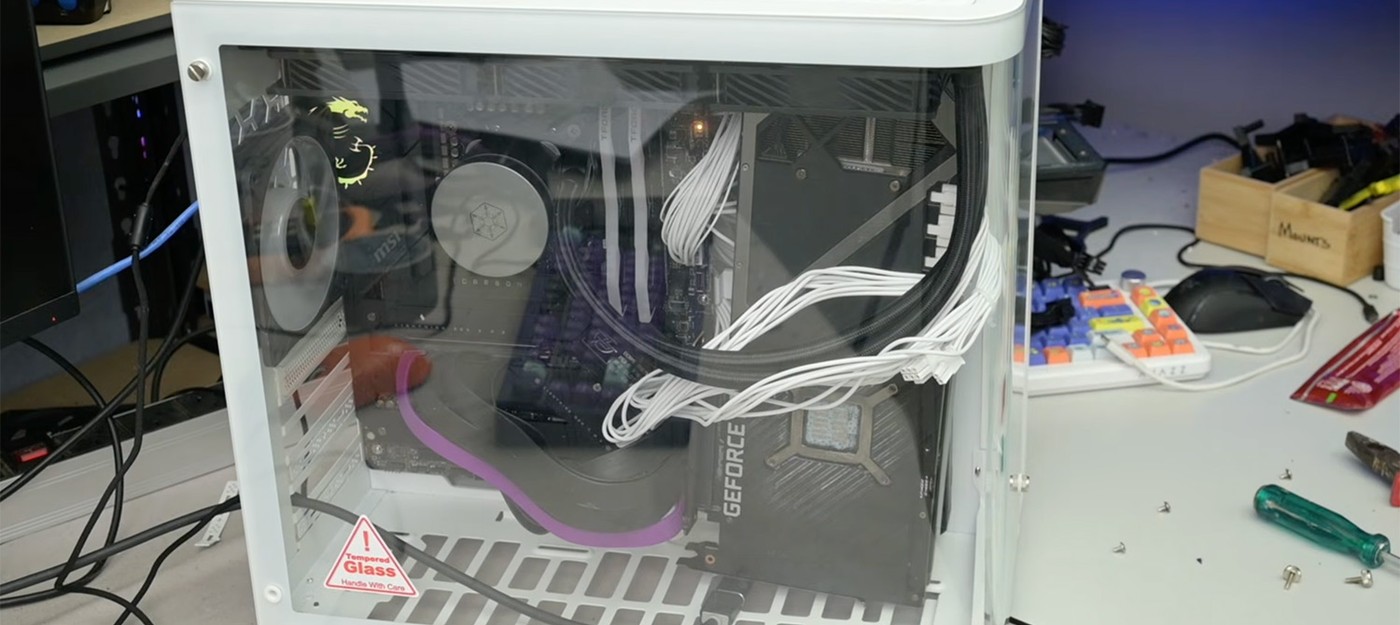
The desktop PC layout has been refined for decades, so it would be logical to assume it has reached an optimal state. TrashBench, an enthusiast known for his cooling experiments, decided to put that to the test.
In a new video, he showed that ditching the standard GPU placement can cut hotspot temperatures by up to 19°C, though the CPU may run hotter as a result.
The hotspot is the hottest point on a GPU die, and it is what the card uses to decide when to throttle clocks due to overheating. The lower it sits, the more headroom there is for stable performance under load and for overclocking.
For the experiment, TrashBench used his own PC with an RTX 3080. He described the plan as "test it normally, then start moving s*** around." The starting build was entirely conventional.
The CPU was cooled by a sealed AIO with a 360mm radiator
The triple-fan RTX 3080 sat in the standard PCIe slot
All fans ran at locked speeds
Baseline numbers came from a constant thermal load, with 3DMark Time Spy and the built-in 7-Zip benchmark looping. Only then did he start "trying to figure out if we've been putting the parts in the wrong place."
With the first alternative build, TrashBench immediately abandoned tidy cable routing, musing that "cable management isn't important here... Is it ever?" From there, he worked through a series of layouts:
The GPU at the bottom of the case
Vertical mounting on the side, with the fans facing different directions
Placement on either side of the three side case fans
The AIO radiator set to exhaust and to intake
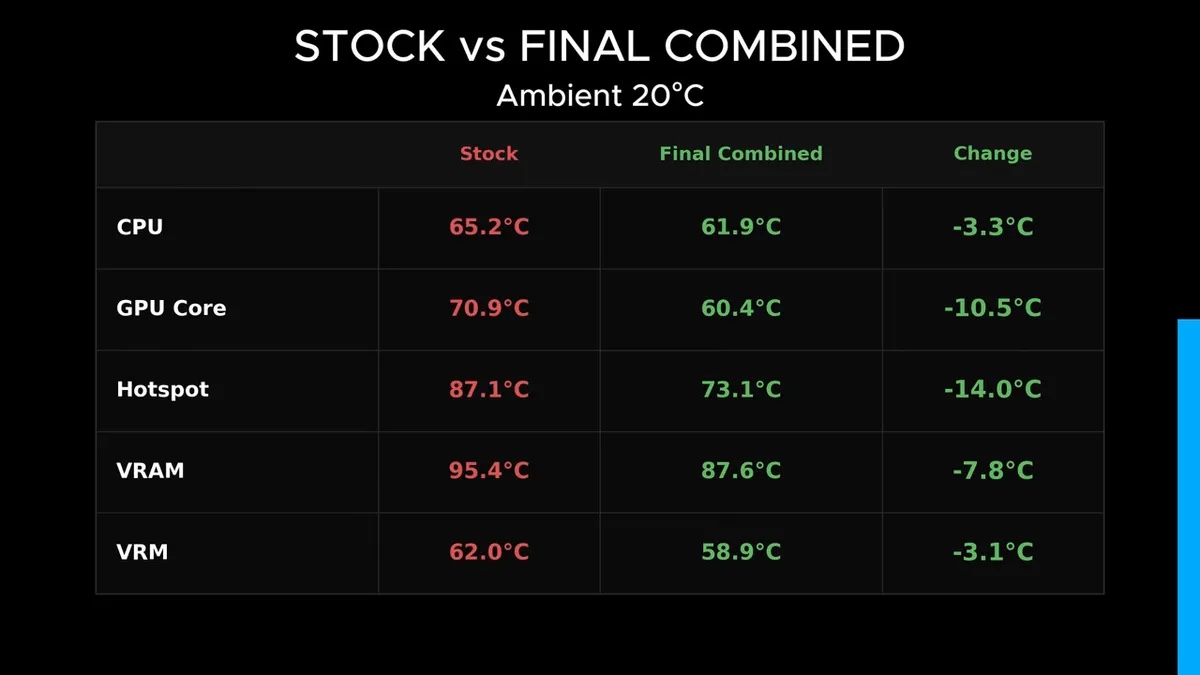
Some configurations mostly helped the GPU, others the CPU. The best hotspot result, a 19°C drop, came with higher CPU temperatures, so he went looking for a setup that benefited both components.
The final layout combines the best findings. The GPU is mounted vertically, right up against the side fans that push fresh air into the case, while the AIO radiator stays in a traditional exhaust configuration.
This compromise cut GPU hotspot temperatures by 14°C and made the CPU 3.3°C cooler. In effect, the graphics card gets a direct stream of cool air and no longer stews in its own heat inside the case.
Anyone looking to repeat these tests will need a PCIe riser cable, which moves the GPU out of the motherboard slot and into any spot that fits. TrashBench used risers of various lengths to try every placement.
Viewers pointed out that a similar effect is possible without radical rebuilds. One gamer gave up glass-panel cases some time ago and runs a North XL with a mesh side panel. The panel comes with a bracket for two 140mm fans that blow outside air straight onto the GPU, CPU, and VRM area.
Another commenter argued that the GPU as an expansion card in a standard ATX slot stopped making sense long ago. Modern graphics cards draw far more power than CPUs and deserve their own spot with direct intake and exhaust airflow. That reader mounted the GPU on the case tray next to the motherboard and fitted a tower cooler to it, so both components pull fresh air from the front and push hot air out the back.
Skeptics counter that manufacturers have no reason to invest in new layout standards until mainstream buyers are ready for them. Another part of the discussion turned to the trend of fishbowl cases with panoramic glass. Users worry that fans moved to the side panel without dust filters will pull in considerably more dust.
- Russian AI enthusiast buys mining farm for $35 and gets 54 GB of video memory to run 35-billion-parameter AI model
- Gamer rid RTX 5090 of melting connectors and cables did not heat above 40 °C over 48 hours under load
- Part of RTX 4090 Founders Edition heatsink fell off after moving PC – repair estimated at $400